How to connect a YT-BTM Bluetooth module to Yatour
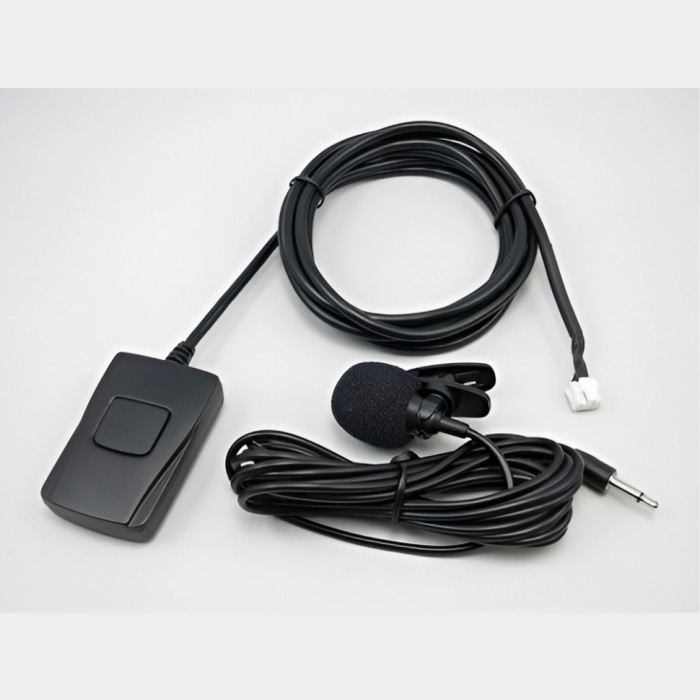
This guide covers the YT-BTM with an answer button and external microphone described in the manual below. It is added to a compatible Yatour adapter. YT-BTK and YT-BTA are different devices and need their own installation instructions.
In this guide
Check that the module is compatible
Find the main adapter’s full label and designated Bluetooth socket. Compare the module plug with your version’s documentation. YT-M06 alone does not guarantee matching connectors. Do not force the module in or modify the plug based on a similar photograph.
A computer USB receiver or any device labelled Bluetooth is not automatically compatible with Yatour. Check the actual combination of devices.
Connect the module, adapter and microphone
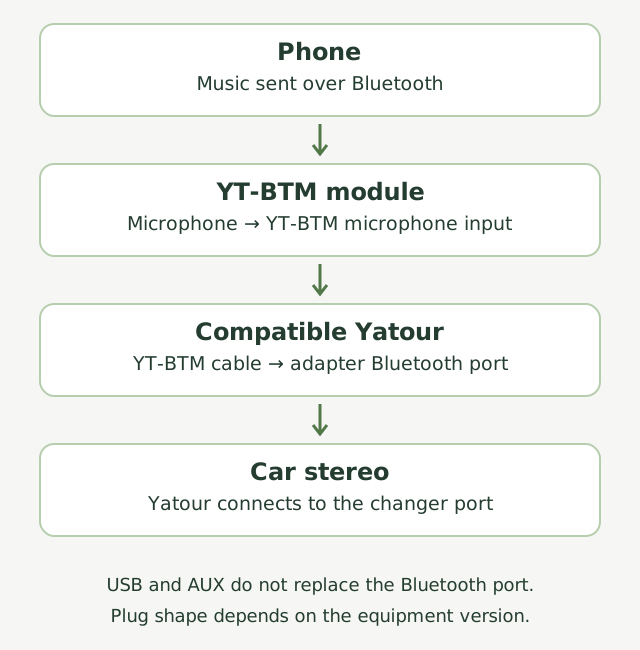
The YT-BTM manual connects the module to the Bluetooth port of an already installed Yatour and the microphone to YT-BTM’s microphone input. Similar-looking sockets can have different purposes: follow the labels and manual.
Plan where to put the button and microphone. Cables must not obstruct the steering wheel, pedals or airbags. If hidden routing requires removing trim near an airbag, have an installer handle that part.
Find YATOUR on your phone
Turn on the stereo and select Yatour. For the module in the cited manual, a rapidly flashing indicator means pairing mode, which lasts three minutes. Find YATOUR in your phone’s Bluetooth settings. If asked for a code, that manual specifies 0000.
If time runs out, hold the module’s answer button for three seconds and search again. The indicator stays lit after successful pairing. These values apply to the described YT-BTM; check the manual if your module has a different identifier.
The phone connects but music is silent
Start playback on the phone and check that audio is routed to YATOUR while the stereo remains in adapter mode. Where available, check that media audio is enabled for this Bluetooth connection.
If a previously paired phone is nearby, temporarily turn its Bluetooth off and try again. Record music and call results separately: a successful call does not test music playback. Check the connection while parked.
When keeping music on USB is useful
Bluetooth suits a phone; USB suits a collection that stays in the car. If you already have albums on your computer, free yatour.site prepares the music and CD01, CD02 folder structure for the drive.
Files are processed locally in your browser and originals stay unchanged. Extract the downloaded ZIP and copy its CD folders to the drive. The tool prepares music; phone pairing and module installation are separate tasks.